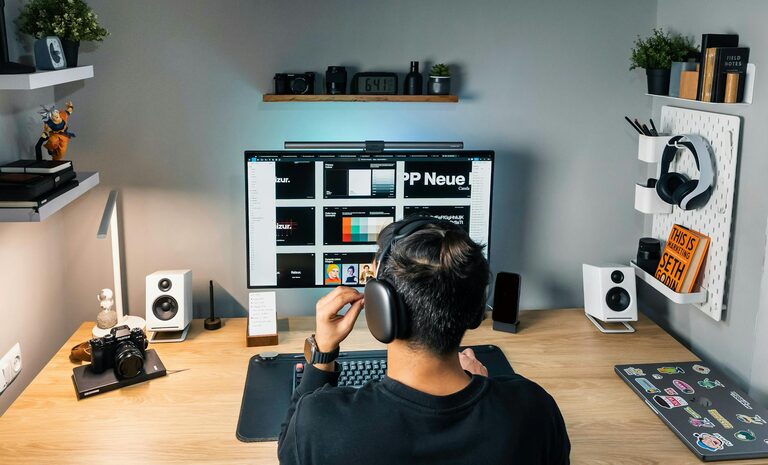
Creating a home office space that is both comfortable and productive can significantly improve your work-from-home experience. Whether you have a dedicated room or just a small corner, a well-designed workspace encourages focus, reduces fatigue, and makes your workday more enjoyable. This guide provides helpful tips to help you set up a home office that suits your needs.
Choose the Right Location
Finding the best spot for your home office is the first step towards a productive workspace.
– Quiet and Private: Ideally, select a space away from high-traffic areas of your home to minimise distractions.
– Natural Light: Position your desk near a window for natural light, which can improve mood and focus.
– Adequate Space: Ensure the area is large enough for your desk, chair, and any other tools or equipment.
If space is limited, a small nook or a corner of the living room can work, but try to maintain boundaries between work and leisure areas.
Invest in Ergonomic Furniture
Comfort is key to avoid aches and strains during long working hours.
– Desk: Choose a desk at a height that allows your arms to rest comfortably at about a 90-degree angle.
– Chair: Invest in an adjustable, supportive chair that promotes good posture and has lumbar support.
– Footrest: A footrest can improve circulation if your feet don’t reach the ground comfortably.
Ergonomic furniture helps prevent back and neck pain, boosts concentration, and makes working more pleasant.
Organise Your Workspace Efficiently
A tidy and organised workspace helps keep your mind clear and focused.
– Declutter: Remove unnecessary items and only keep essentials within reach.
– Storage Solutions: Use shelves, drawers, or filing cabinets to organise paperwork and supplies.
– Cable Management: Use clips or sleeves to keep cables tidy and avoid trip hazards or visual clutter.
Consider dedicated spots for stationery, chargers, and frequently used items to save time looking for them.
Optimise Lighting
Good lighting reduces eye strain and creates a more inviting workspace.
– Natural Light: Maximise daylight by positioning your workspace near windows.
– Artificial Lighting: Use a desk lamp with adjustable brightness and a neutral colour temperature, ideally around 4000K to 5000K.
– Avoid Glare: Arrange screens to avoid glare from windows or lamps.
Adjust the lighting according to the time of day to maintain comfort and alertness.
Personalise Your Space
Adding personal touches makes your home office feel welcoming and motivating.
– Plants: Indoor plants improve air quality and add a refreshing touch.
– Artwork: Hang inspiring pictures, prints, or a vision board to encourage creativity.
– Comfort Items: Use cushions, a cosy throw blanket, or a favourite mug to make the space more inviting.
Personalisation can make working from home feel less like a chore and more like a pleasant routine.
Minimise Distractions
Staying focused can be a challenge when working from home, so it helps to design your space to reduce interruptions.
– Noise Control: Use noise-cancelling headphones or background music if needed.
– Separate Work and Leisure: Avoid having TV or unrelated activities nearby.
– Clear Boundaries: Inform family or housemates about your working hours and space to respect your focus time.
By creating a distraction-free zone, you’ll be able to maintain better concentration throughout the day.
Maintain Good Air Quality and Temperature
Comfort isn’t just about furniture — environmental factors matter too.
– Ventilation: Keep windows open when possible or use an air purifier to ensure fresh air.
– Temperature: Aim for a comfortable room temperature, usually between 18-22°C.
– Humidity: Use a humidifier or dehumidifier if needed to maintain balanced humidity levels.
Good air quality helps prevent fatigue and keeps you alert.
Use Technology Wisely
Efficient use of technology can streamline your workflow.
– Reliable Equipment: Invest in a good-quality computer, high-speed internet, and necessary peripherals like printers or scanners.
– Dual Monitors: Multiple monitors can boost productivity for tasks that require reference materials.
– Cable Organisation: Keep cords organised and use wireless devices if possible to reduce clutter.
Ensure your workspace supports your technological needs comfortably.
Establish a Routine
A structured approach helps separate work time and personal time.
– Set Working Hours: Choose consistent start and finish times to create boundaries.
– Regular Breaks: Use techniques like the Pomodoro method to rest your eyes and stretch.
– End-of-Day Ritual: Tidy your desk and shut down devices to signal the end of work.
Routines support productivity and help maintain work-life balance.
—
Setting up a comfortable and productive home office doesn’t require a large budget or space. Thoughtful planning, attention to comfort, and organisation make all the difference. Try these tips to create a workspace that supports your best work and keeps you motivated every day.
About the Author