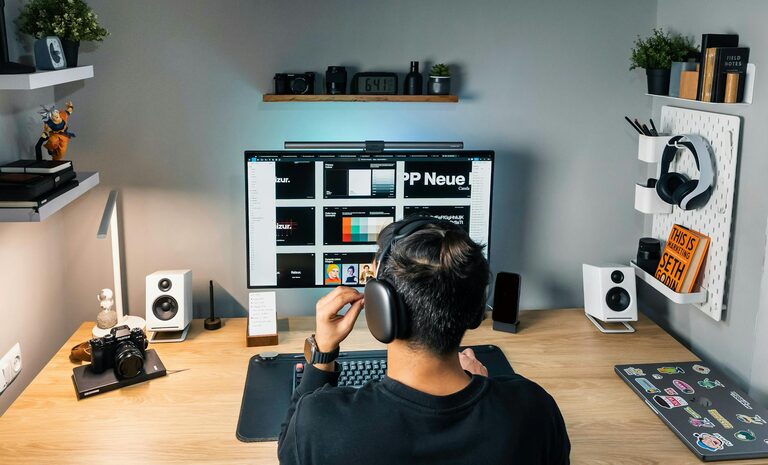
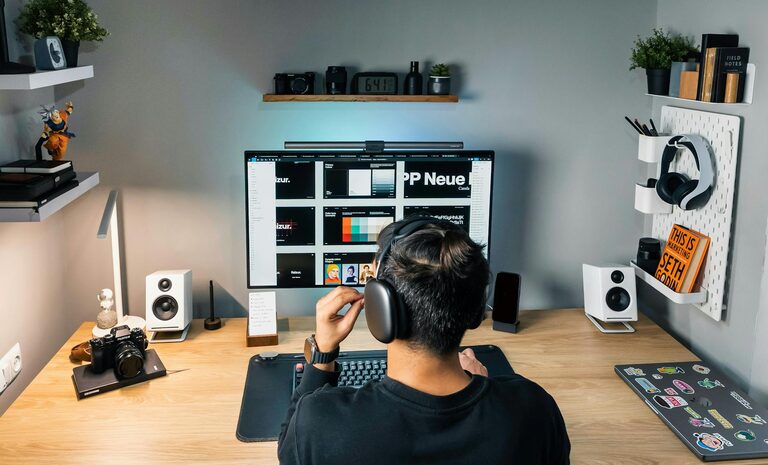
Working from home has become a common part of many people’s lives, making it essential to have a space that fosters productivity and comfort. Whether you’re new to remote work or looking to improve your existing setup, creating an effective home workspace can make a significant difference in your focus, motivation, and overall well-being.
In this post, we’ll explore practical tips on how to design a home workspace that supports your work habits while keeping you comfortable throughout the day.
Choose the Right Location
Selecting an appropriate spot in your home for your workspace is the first step. Consider the following:
– Quiet and Low Traffic: Try to find a space away from busy family areas to minimise distractions.
– Good Natural Light: Position your desk near a window if possible; natural light can lift your mood and reduce eye strain.
– Space Availability: Ensure there’s enough room for your equipment and movement without feeling cramped.
If space is limited, try setting up your workspace in a corner of a room or using room dividers to create separation.
Prioritise Ergonomics
A comfortable workspace should support your body and reduce strain during long hours of work. Here’s how to improve your setup ergonomically:
– Desk and Chair Height: Your desk should allow your elbows to rest comfortably at about 90 degrees. Use an adjustable chair that supports your lower back and lets your feet rest flat on the floor or on a footrest.
– Monitor Position: The top of your computer screen should be at or slightly below eye level and about an arm’s length away to prevent neck and eye strain.
– Keyboard and Mouse: Keep these close enough to avoid stretching and consider ergonomic options to reduce wrist fatigue.
– Take Breaks: Stand up and stretch regularly to avoid stiffness.
Investing in ergonomic furniture or accessories can be worthwhile for your long-term health and productivity.
Keep It Organised
An organised workspace helps clear your mind and reduces the time spent searching for items.
– Use Storage Solutions: Shelving, filing cabinets, and desk organisers can keep documents and supplies tidy.
– Cable Management: Use clips or boxes to manage cords and prevent clutter.
– Daily Clean-Up: Spend a few minutes at the end of each day organising your desk to start fresh the next morning.
Decluttering your workspace can also create a more inviting and motivating environment.
Personalise Your Space
Adding a personal touch can make your workspace feel more enjoyable and inspire creativity.
– Add Plants: Indoor plants can improve air quality and add a calming effect.
– Artwork and Photos: Displaying pictures or art you like can boost your mood.
– Comfort Items: Consider a cozy cushion, a favourite mug, or scented candles to enhance comfort.
Just be sure not to overcrowd the space, as too many items might become distracting.
Ensure Adequate Lighting
Good lighting is crucial to reduce eye strain and fatigue.
– Natural Light: Maximise daylight whenever possible.
– Task Lighting: Use a desk lamp with adjustable brightness to focus light where you need it.
– Avoid Glare: Position screens to prevent reflections from windows or lights.
Adjusting your workspace lighting according to the time of day can help maintain energy levels.
Manage Noise Levels
Noise can be a significant distraction when working from home. To keep noise under control:
– Use Noise-Cancelling Headphones: These can help block out background sounds.
– White Noise Machines or Apps: Steady sounds like white noise may improve concentration.
– Communicate Boundaries: Let household members know your working hours and ask for quiet during these times.
Creating a quiet environment supports focus and efficiency.
Maintain a Healthy Routine
A productive workspace is more than just a room; it’s part of a healthy work routine.
– Schedule Breaks: Take regular short breaks to stretch, hydrate, and rest your eyes.
– Set Clear Work Hours: Defining when your workday starts and ends helps maintain work-life balance.
– Stay Active: Incorporate movement or exercise to reduce the physical effects of sitting.
Your workspace should support these habits, encouraging good posture and movement.
Upgrade Your Technology
Reliable technology is essential for effective remote work.
– Fast Internet Connection: Essential for video calls and cloud-based tasks.
– Quality Equipment: Invest in a good keyboard, mouse, headset, and monitor.
– Backup Power or Surge Protectors: Protect your devices and avoid interruptions.
Keeping your tech up to date reduces frustration and helps you work smoothly.
—
Creating a comfortable and productive home workspace takes some planning and effort but can greatly improve your work-from-home experience. By focusing on the right location, ergonomics, organisation, lighting, noise control, and routine, you can build a space that supports your success and well-being.
Remember, your workspace should reflect your needs and preferences. Feel free to experiment and adjust until you find what works best for you. Happy working!
About the Author